Introduction
In class you built a language model by hand. For each word in the rhyme you tallied which words came next, and then you generated new text by starting with a word, looking up its row, and rolling a die (or flipping a coin) to choose the next word. In this tutorial you will do the same thing in Python. Then you will run the model on an entire book, too long to tally by hand. There are two research questions:
- Does Python’s model match the one you built by hand?
- What does the same model do with a whole book?
We will work with the rhyme for question 1 and then with Alice’s Adventures in Wonderland for question 2.
You will need everything from the last tutorial (loops, if statements, dictionaries, and your clean function). Along the way you will also meet range and the random module, and make your first plot.
Getting started
Keep working on this week’s lab. Make a new notebook called counting_model.ipynb in notebooks and choose the .venv kernel. We need the paths and the rhyme again, and the clean function from the last tutorial. Each notebook has its own variables and functions, so copy the function from your repeating_and_deciding.ipynb notebook into a cell in this one.
from pathlib import Path

DATA_RAW = Path("../data/raw")
OUTPUTS = Path("../outputs")


def clean(text):
    """Split text into lower-case words and strip punctuation from each one."""
    words = []
    for word in text.lower().split():
        word = word.strip('.,!?;:"()')
        if word != "":
            words.append(word)
    return words


rhyme = clean((DATA_RAW / "the_star.txt").read_text(encoding="utf-8"))
rhyme[0:6]
['twinkle', 'twinkle', 'little', 'star', 'how', 'i']
The table of next words
The table you made in class had one row for each word, listing every word that came right after it in the rhyme. To build it, we need to go through the text one pair of neighboring words at a time (the first word and the second, the second and the third, and so on).
So far our loops have gone through a list item by item. Here we need the positions of the items, because the neighbor of the word at position i is the word at position i + 1. The range function gives us a sequence of positions. range(5) counts 0, 1, 2, 3, 4 (like a slice, it stops just before the number you give it).
for i in range(5):
    print(i, rhyme[i], rhyme[i + 1])
0 twinkle twinkle
1 twinkle little
2 little star
3 star how
4 how i
The rhyme has 44 words but only 43 neighboring pairs, because the last word has nothing after it. To go through every pair we use range(len(rhyme) - 1).
For the table, we want a dictionary whose keys are words and whose values are lists of the words that followed them. Each time we see a pair, we add the second word to the list for the first word. If the first word does not have a list yet, we give it an empty one first.
next_words = {}
for i in range(len(rhyme) - 1):
    word = rhyme[i]
    following = rhyme[i + 1]
    if word not in next_words:
        next_words[word] = []
    next_words[word].append(following)
Let’s look up a few rows.
['twinkle', 'little', 'twinkle', 'all']
['world', 'sky', 'blazing', 'night']
Compare these with your table from class. “Twinkle” was followed by “twinkle” twice and by “little” and “all” once each, and our list has “twinkle” in it twice. Most words, like “star”, have only one word that ever followed them:
Is there a row for “night”?
No. “Night” is the last word of the rhyme, so no word follows it. That is the same thing that happened in class when someone’s line reached “night” and stopped.
Random choices
To choose the next word, Python needs to make a random choice, the way you rolled a die. The random module (it comes with Python, like pathlib) has a function called choice that picks one item from a list at random, with every item equally likely.
import random

random.choice(next_words["twinkle"])
Run that cell several times and you will get different answers. Because “twinkle” appears twice in the list and the others once, choice picks “twinkle” half the time, just like giving it two faces of the die (or two of your four options). The counts are built into the list.
Random choices are a problem when we want someone else (or ourselves, later) to get the same results. Computers do not really roll dice. They compute a long sequence of numbers that looks random, starting from a number called a seed, and the same seed always gives the same sequence. Set the seed, and then run the cell a few times:
random.seed(295)
random.choice(next_words["twinkle"])
Every time you run that cell you get the same word, and anyone who uses the same seed (and the same version of Python) gets the same word you do. In this tutorial we set a seed whenever we generate text, so that your results match the ones on this page.
Generating a line
To generate a line, start with a word, look up its list, choose one of its next words at random, and add it to the line. Then do the same with the new word, and so on. Stop after a fixed number of words, or sooner if we reach a word that has no row.
random.seed(295)

word = "twinkle"
line = [word]
for step in range(9):
    if word not in next_words:
        break
    word = random.choice(next_words[word])
    line.append(word)

" ".join(line)
'twinkle twinkle all the night'
break stops a loop early, and we use it when the model reaches a word that has no row, the way “night” stopped you in class. In the last line, the string method join joins the words of a list into one string, with a space between each pair.
Notice that the line starts out like the rhyme and then stops following it. The model uses only the current word, so after “the” it can choose any of the 4 words that ever followed “the”, from any line of the rhyme.
Making it a function
We will generate a lot of text, so let’s make this a function. It takes the table, a starting word, and the number of words we want.
def generate(next_words, start, n_words):
    """Generate text from a table of next words, beginning with start."""
    word = start
    line = [word]
    for step in range(n_words - 1):
        if word not in next_words:
            break
        word = random.choice(next_words[word])
        line.append(word)
    return " ".join(line)
random.seed(1)
for trial in range(4):
    print(generate(next_words, "twinkle", 10))
twinkle little star how i wonder what you show your
twinkle twinkle all the night
twinkle all the night
twinkle twinkle little star how i wonder what you show
We used one model and one starting word and got four different lines. Each line is one draw from the model. A chatbot can give different answers to the same question for this reason, so a single answer shows only one of the things the model might have said.
A bigger text: Alice’s Adventures in Wonderland
Now for research question 2. The rhyme has only 44 words, so the model does not have much to work with. The file alice.txt in data/raw holds all of Lewis Carroll’s Alice’s Adventures in Wonderland (1865), from Project Gutenberg. (We removed Project Gutenberg’s introduction and license from this copy before putting it in data/raw, so the file holds only the book. With your own text, you will do that step in code.) Books this old are in the public domain in the United States, which means anyone can use them.
alice_text = (DATA_RAW / "alice.txt").read_text(encoding="utf-8")
alice_text[0:300]
'CHAPTER I.\nDown the Rabbit-Hole\n\n\nAlice was beginning to get very tired of sitting by her sister on the\nbank, and of having nothing to do: once or twice she had peeped into\nthe book her sister was reading, but it had no pictures or\nconversations in it, “and what is the use of a book,” thought Alice\n'
That is the first 300 characters of the book. How many characters are there in all?
Checking the words
Let’s clean it with our function and look at the result.
alice_words = clean(alice_text)
len(alice_words)
Before we build anything with this list, we should look at it. A quick way to spot trouble is to count the “words” that contain something other than letters. The string method isalpha is True when a string contains only letters.
odd = {}
for word in alice_words:
    if not word.isalpha():
        if word in odd:
            odd[word] = odd[word] + 1
        else:
            odd[word] = 1

len(odd)
There are a lot of odd words. Here are a few:
['rabbit-hole',
 '“and',
 'book,”',
 '“without',
 'conversations?”',
 'daisy-chain',
 '_very_',
 '“oh',
 'late!”',
 '_took',
 'waistcoat-pocket_',
 'waistcoat-pocket',
 'book-shelves',
 '“orange',
 'marmalade”']
Some of these are fine (rabbit-hole and daisy-chain really are words), but many still have punctuation attached. This book uses curly quotation marks and apostrophes (“ ” ‘ ’), which are different characters from the straight double quotation mark (") that we told strip to remove. It also uses underscores to mark words in italics (as in _very_), long dashes (—), and rows of asterisks between sections.
Our clean function was written for the rhyme, and this text needs more. Let’s add those characters to the list that strip removes. (Since strip only works on the ends of a word, apostrophes inside words stay, so don’t stays don’t.) The line with the new characters is hard to type, because most keyboards have no keys for curly quotation marks or long dashes, so select it on this page and copy it.
def clean(text):
    """Split text into lower-case words and strip punctuation from each one."""
    words = []
    for word in text.lower().split():
        word = word.strip('.,!?;:"()“”‘’_—*')
        if word != "":
            words.append(word)
    return words


alice_words = clean(alice_text)
len(alice_words)
(A few oddities are still left, such as words joined by a dash without a space. They are rare enough to ignore.)
Building the model
Now we build the table exactly as we did for the rhyme. We could copy the loop, but we might as well make it a function, too.
def build_table(words):
    """For each word, list every word that follows it in words."""
    next_words = {}
    for i in range(len(words) - 1):
        word = words[i]
        following = words[i + 1]
        if word not in next_words:
            next_words[word] = []
        next_words[word].append(following)
    return next_words


alice_table = build_table(alice_words)
len(alice_table)
The table has a row for each of the 2777 different words in the book. Most rows are much longer than the rows for the rhyme. Here are the first ten words that follow “of”, out of 508 in all:
['sitting',
 'having',
 'a',
 'making',
 'getting',
 'the',
 'its',
 'it',
 'time',
 'the']
Now generate some text.
random.seed(295)
for trial in range(4):
    print(generate(alice_table, "alice", 15))
alice again with the sneeze of me out of a pair of her calling out
alice was impossible to be very uncomfortable the thought but i should all would be
alice was a chrysalis—you will you getting home why that one paw round the mouse
alice to feel encouraged to me whether the mock turtle but was a great deal
Every pair of neighboring words in those lines appears somewhere in the book (once the punctuation is gone), but the lines themselves mostly do not. The model joins pairs from the book into sentences Carroll never wrote. The text sounds a bit like Alice, but nothing in the model represents what the words mean or whether a sentence is true.
Counting words, and a first plot
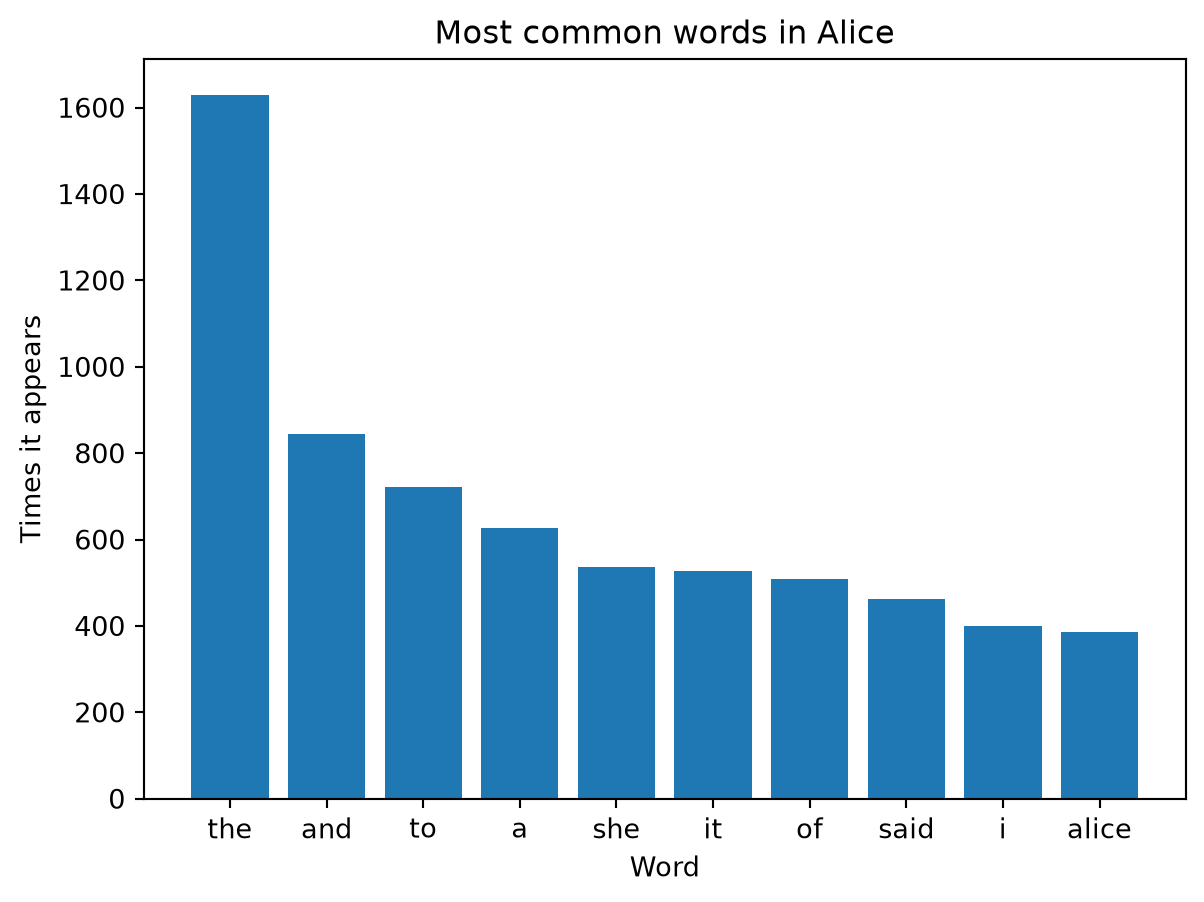
Python comes with a tool that does what our counting loop from the last tutorial did. Counter, from the collections module, counts the items in a list, and its most_common method returns the most frequent ones.
from collections import Counter

alice_counts = Counter(alice_words)
top_ten = alice_counts.most_common(10)
top_ten
[('the', 1630),
 ('and', 844),
 ('to', 721),
 ('a', 627),
 ('she', 537),
 ('it', 526),
 ('of', 508),
 ('said', 462),
 ('i', 400),
 ('alice', 385)]
most_common gives us a list of pairs, each written in parentheses. (A pair like this is called a tuple. It is like a list, but it cannot be changed.) A loop can take each pair apart into its two pieces:
labels = []
values = []
for word, count in top_ten:
    labels.append(word)
    values.append(count)

labels
['the', 'and', 'to', 'a', 'she', 'it', 'of', 'said', 'i', 'alice']
Now let’s plot them. We will make plots with a package called matplotlib, which this lab already has (it is listed in pyproject.toml). By convention, Python programmers import the part of matplotlib we need under the short name plt.
import matplotlib.pyplot as plt

fig, ax = plt.subplots()
ax.bar(labels, values)
ax.set(xlabel="Word", ylabel="Times it appears", title="Most common words in Alice")
plt.show()
There is your first plot! Every plot we make this semester starts the same way. plt.subplots() makes a figure (the whole picture, which we call fig) and a set of axes (the plotting area inside it, which we call ax). Then we draw on the axes (here with bar, for a bar chart), and use set to add labels and a title. The plt.show() line displays the plot. There are shorter ways to make some plots, but we recommend this one, because it works for every kind of plot and you will see it often in scientific Python code, including code that AI tools write.
To save the plot as an image file, use the figure’s savefig method. Plots you make go in the lab’s outputs folder.
fig.savefig(OUTPUTS / "top_words_alice.png", dpi=200, bbox_inches="tight")
The option dpi=200 makes a sharp image, and bbox_inches="tight" trims the extra white space around it. Look in the outputs folder in the Explorer to find the file, and click it to see it.
Saving what you made
Let’s save some generated text in outputs. The write_text method writes a string to a file, and it takes the same encoding option as read_text.
random.seed(295)
generated = []
for trial in range(5):
    generated.append(generate(alice_table, "the", 20))

(OUTPUTS / "generated_alice.txt").write_text("\n\n".join(generated), encoding="utf-8")
The number it shows is the number of characters written. Open the file from the Explorer to check it.
How real language models differ
This is about as simple as a language model gets, and most of what it writes is nonsense, but the core idea is right. It looks at the text so far (for our model, only the last word), lists the words that could come next, and picks one at random, in proportion to how often each one came next. A large language model does the same kind of thing, with three big differences. It works with tokens (words and pieces of words), and it looks back over far more of the text than one word. Instead of a table of counts, it uses a neural network trained on an enormous amount of text, which lets it give sensible probabilities even to combinations of words it has never seen. (Chatbots also adjust how random the choice is, and they are trained further to follow instructions.)
Answering the research questions
Python’s model matches the one you built by hand. Its table has the same rows as your table from class, and it generates lines the way you did, choosing each next word at random from the current word’s row (research question 1). With a whole book, the model writes lines that sound a bit like Alice, because every pair of neighboring words in them comes from the book. But most of the lines are sentences Carroll never wrote, and nothing in the model represents what the words mean or whether a sentence is true (research question 2).
Your turn
Work below the tutorial code, with a Markdown cell before each question.
- Your own text. Find a public-domain text that interests you, perhaps from your own field. Project Gutenberg has thousands, from Darwin’s On the Origin of Species to The Federalist Papers and W. E. B. Du Bois’s The Souls of Black Folk. On the book’s page, right click the Plain Text UTF-8 link, choose Save Link As… (Download Linked File in Safari), and save the file in data/raw. (If your browser puts it in Downloads, move it into data/raw in Finder or File Explorer.) Do not edit the file. After you read it in, use the string method index to find where the lines that begin with
*** START OF and *** END OF are, and keep only the text in between with a slice. (It is fine if the *** START OF line itself stays in.) Then clean the text, look for odd words the way we did, and adjust your clean function if you need to. Build a table and generate a few lines. Save one generated text file and a bar chart of the ten most common words in outputs. In a Markdown cell, describe how the generated text compares with the Alice text.
- Seeds. Generate four lines starting with “the” using seed 1, and then four using seed 2. Run each cell twice. What changes, and what stays the same? In a sentence or two, explain why setting a seed matters if you want someone else to check your work.
- What-if questions. Answer in Markdown.
- Our model looks one word back. Suppose it looked two words back, so that each row was for a pair of words (“the white”, “white rabbit”, …). What would the keys of the table be? Would the generated text be closer to the book or further from it? Would the model need more text or less to work well, and why?
- When our rhyme model reached “night”, it stopped. Could that ever happen with the Alice model? What is the last word of the book?
- The model made up sentences that do not appear in the book. Pick one of your generated lines and check whether it appears in the book. Search the cleaned words, not the raw text, because line breaks and punctuation in the raw text get in the way. The
in operator works on strings: "down the rabbit-hole" in " ".join(alice_words). Why would a model like this produce text that sounds right but was never written?
These are optional.
- Which word in Alice is followed by the most different words? (For one row,
len(set(alice_table["of"])) counts the different words in it, because a set keeps one copy of each item.) Then find a word that is common in the book but almost always followed by the same word.
- Build the two-word model from question 3a. A tuple such as
("the", "white") can be a dictionary key.
- Measure how original the model is. Generate a long stretch of text, and find the fraction of its four-word sequences that appear word for word in the book. (Compare tuples of four words, not pieces of one long string, so that “but i” does not match “but it”.) How does that fraction change for the two-word model?
What to hand in
Click Restart and then Run All. Check that everything runs and that the results still match the tutorial and your notes, and save. Both notebooks from this week (repeating_and_deciding.ipynb and counting_model.ipynb) should be in your repository. Commit your work, including the files in outputs, and push it to GitHub by the week 2 deadline on the schedule.
Back to top